|
Layer compositing for Everyone.
LiveQuartz makes layer management very easy. With its layers list, you can add, remove, drag, drop, re-order and merge layers in a very intuitive and non-destructive way.
|
|
|
Dynamic filters for Everyone.
LiveQuartz is born around the same time as CoreImage. Since then, LiveQuartz has a very powerful non-destructive filters list for each of its layers.
LiveQuartz 2 provides more than 110 filters.
|
|
|
Touch your layers.
On multi-touch trackpad enabled Macs, you can use gestures:
'Swipe' for tools and layer control, 'Pinch & Expand' for magnification and layer zoom transformation and layer 'Rotation'.
|
|
|
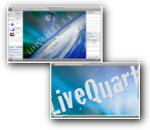
One window user interface.
LiveQuartz has all of its user interface in one window. Available tools settings appear as you select the tool.
Layers and Filters list can be hidden easily to have all the window space available for your photo. Combined with full screen presentation and retina display support, your image creation could take advantage of every pixels available on your screen.
|
|
The software is localized in 11 languages :
English, Traditional Chinese, Simplified Chinese, Danish, French, German, Italian, Japanese, Persian, Russian and Spanish.
|
